Writix Review: Is This the Most Powerful AI Content Tool for Business in 2025?
Creating business content today is not what it was five years ago. You are expected to produce more, in less time, for more platforms: social media, blog posts, ad copy, internal documentation. If you are a solopreneur or small business owner, it often feels like you need to clone yourself just to keep up.
That is exactly why I was interested in testing Writix, an AI business content generator that claims to cover every content and marketing need with 300+ ready-made workflows. In this review, I will walk through the features, share what I found in the demo, break down the pros and cons, and give an honest take on whether it earns a spot in your toolkit.
Who Is Writix For?
Before getting into features, it helps to understand what businesses actually expect from a tool like this: speed, accuracy, flexibility, and ease of use. Most users do not want to become AI experts; they want results. Whether it is content creation, process documentation, or marketing collateral, people want an assistant that understands business needs, requires minimal input, and delivers consistent quality.
Writix is not only for copywriters or bloggers. It is built for small business owners who need content but have no marketing team, agencies and freelancers looking to speed up delivery, HR professionals handling documentation and SOPs, solopreneurs managing multiple channels, and teams working across languages and markets.
Benefits of Using Writix
The biggest benefit, in my experience, is that it eliminates prompt engineering. Most AI tools require you to keep refining your prompts until you land on something usable. With Writix, the workflows are already optimized: you choose what you want to create, fill in a few details, and generate.
It also saves real time. Writing a blog outline, a social post, and a YouTube script took under 10 minutes total, work that used to take hours. Writix is not limited to marketing content either; you can create internal SOPs, training docs, and HR materials, which makes it useful across departments. It also supports multiple languages, so reaching a global audience or managing clients across regions does not require a separate translation tool.
For content creators specifically, the built-in logic of each workflow means relevant output with minimal input, useful when you are juggling multiple platforms or deadlines. Because Writix lets you switch between different AI models and adjust inputs, you are not locked into one voice or style, which matters if you write for clients with different brand tones.
Features of Writix
Most AI content tools ship with a prompt box, a handful of templates, and access to a single AI engine. You typically end up juggling separate tools for blogs, emails, documentation, and translation. Writix approaches this differently: it positions itself as a full AI automation system for business, not just a text generator.
300+ Prebuilt Workflows
Templates for a wide range of content and business tasks, from blog posts to email campaigns to HR documents. New workflows are added regularly.
Task Packages
Group related tasks together instead of running them one by one. A landing page, an email sequence, and social captions for a product launch can all be generated in one pass.
Interactive AI Tasks
Rather than a static form, the platform asks smart follow-up questions based on your inputs, which results in more personalized, accurate output.
Multi-AI Integration
You can choose between multiple AI engines including OpenAI, Claude, LLaMA, and Mistral, letting you experiment with different tones and writing styles.
Custom Workflow Builder
If the prebuilt workflows do not cover your exact use case, you can build your own, giving you flexibility over your own processes.
Multilingual Output
Content generation in all major languages, useful whether your audience is English-speaking or spread across Europe, Asia, or South America.
Writix Demo: What It Looks Like Inside
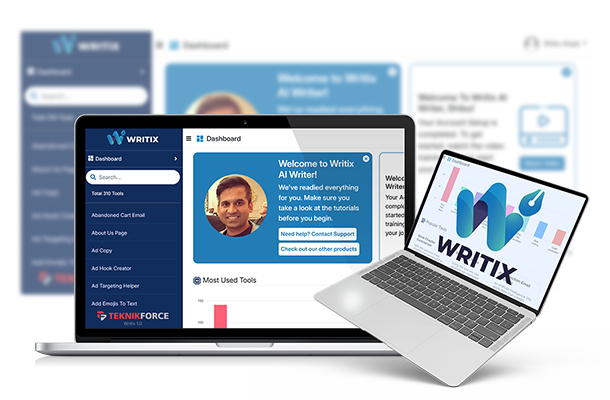
During my hands-on test, the dashboard felt clean and intuitive. Workflows are categorized (Blog Writing, Social Media, Business Docs), and clicking into one opens a short input form: you fill in your business or product details and hit generate. The AI returns formatted content within seconds. I created a blog post outline, a LinkedIn post, and a YouTube script, all done end to end in under 10 minutes.
What Could Be Better
Writix nails most of what it sets out to do, but a few areas could use polish. The mobile interface is functional but not ideal for extended use; it is best experienced on desktop. There is a modest learning curve around understanding task packages and workflow logic, even though it is easier than prompt-based tools. And currently Writix is text-focused: workflows for visual content like infographics or slide decks would round out the platform further.
None of these are deal-breakers. They read more like polish items on an already capable tool, and the time saved on the content side outweighs the gaps on the visual side.
Pros and Cons
Pros
- Eliminates the need for prompt engineering
- Cuts content creation time drastically across formats
- Covers business documentation, not just marketing content
- Multilingual output without a separate translation tool
- Multiple AI model options for different tones and voices
Cons
- Mobile experience is limited; best used on desktop
- Some learning curve around task packages for absolute beginners
- No visual content workflows yet, such as infographics or slides
For a tool built around speed and volume, these trade-offs are minor. But they are worth knowing before you plan to run your entire content operation through it.
My Verdict
If you are serious about automating content and scaling business processes without hiring more people or learning advanced prompt engineering, Writix is a solid pick. It streamlines workflows, saves time, and delivers consistently usable output out of the box.
Most businesses currently pay for separate tools to handle blog writing, email marketing, documentation, and translation, which can easily add up to $200 to $300 a month in subscriptions combined. Writix replaces that stack, often at a one-time cost during launch pricing, which makes the math straightforward for any business producing regular content.
Whether you are a marketer, solopreneur, agency owner, or HR professional, Writix helps you get more done in less time, and with less stress about where to start.
Watch the full video review above or read the written breakdown above.